ASM Editor: RISC-V assembly in your browser
Explore ASM Editor's browser workspace, RARS-based RISC-V simulator, debugger, simulated peripherals, project sharing, and C/C++ support.
What is ASM Editor?
ASM Editor is an online workspace for writing, running, and debugging assembly programs. It brings a code editor, a processor simulator, debugging tools, and learning material into one application. You can organize source files in a project or get started with a runnable example.
The editor and simulator run in your browser, without a local installation. RISC-V is one of its supported architectures, alongside MIPS, M68K, Z80, and x86. Choose RISC-V for 32-bit programs (RV32) or RISC-V-64 for 64-bit programs (RV64).
A workspace for learning assembly
ASM Editor keeps your source code, program output, and simulated machine state together. You can investigate how a program behaves, find problems, and experiment with changes.
The RISC-V course and instruction and syscall reference support that work with lessons and examples you can run directly in the page. You can move from reading about a feature to trying it, then open the example as a project when you want more room to work.
Tools for writing and debugging programs
- Project workspace. Keep a program's source files together and edit them in the browser.
- Interactive execution. Build and run programs, pause at breakpoints, step through execution, and use Undo to revisit recent execution states.
- Program inspection. View registers, memory, output, execution history, and the call stack alongside your code.
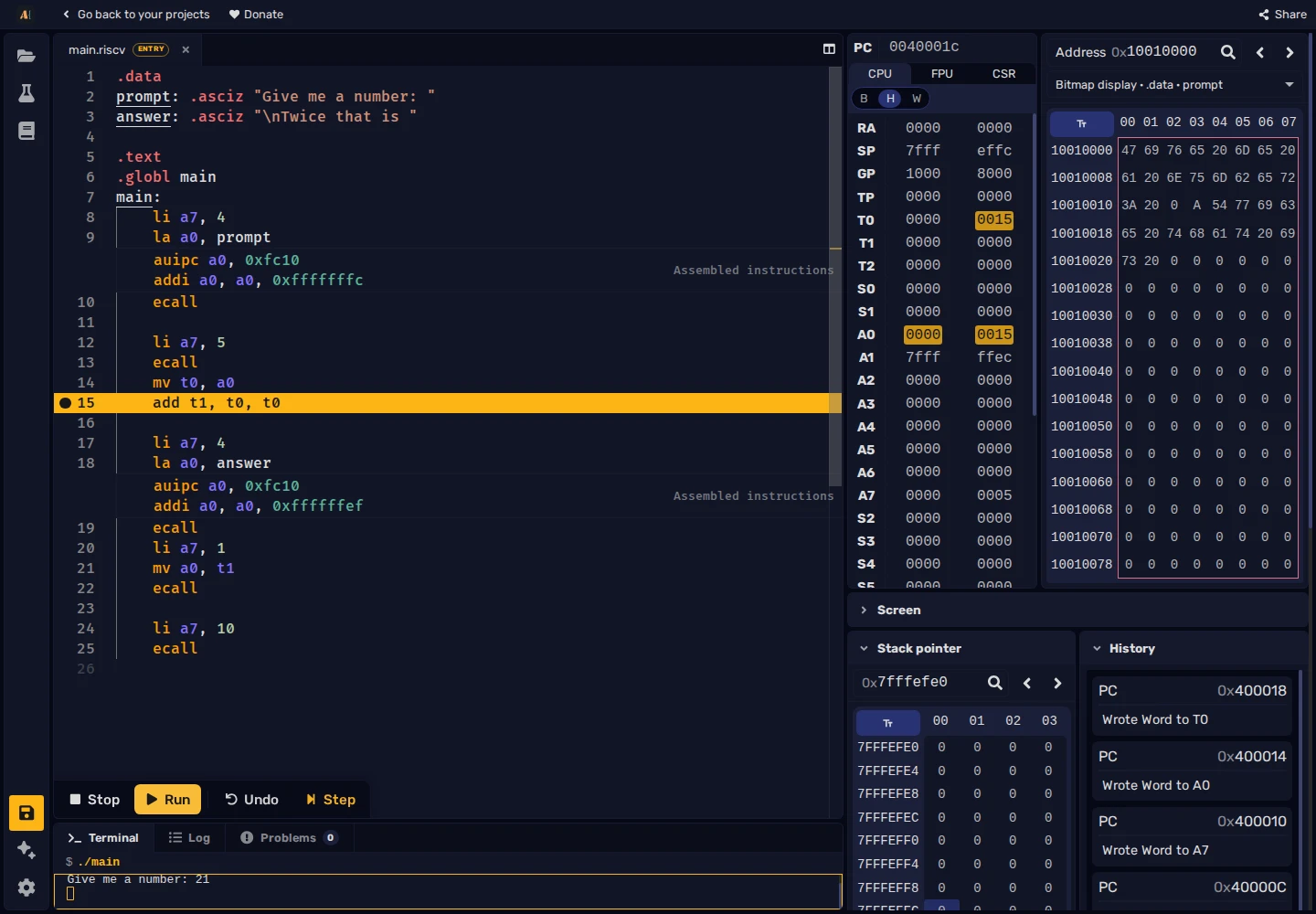
The debugger keeps the paused instruction, registers, memory, and execution history visible together.
Graphics, input, and files
ASM Editor includes simulated peripherals for interactive programs. On RISC-V, these include a bitmap display for graphics, keyboard input, and a terminal for text input and output. Programs can also read and write files in the project's virtual filesystem.
These facilities support animations, small games, and programs that work with files, all within the browser. The screen and keyboard reference describes the available devices.
The RARS simulator and more
ASM Editor's RISC-V simulator comes from RARS, adapted to run in the browser. It keeps RARS's instruction syntax, register names, and ecall conventions. You can bring RARS assembly exercises into the browser workspace without learning a different assembly dialect.
ASM Editor adds several tools around that simulator:
- Built-in testcases. Run a program with predefined input and check its output, registers, or memory. Results show actual values beside expected ones.
- Shareable projects. Send a link containing a snapshot of your files, configuration, and testcases. The recipient gets an editable copy, useful for sharing a question or distributing a classroom example.
- Embeddable examples. Put a runnable program in a lesson or another web page, with a button to continue in the full editor.
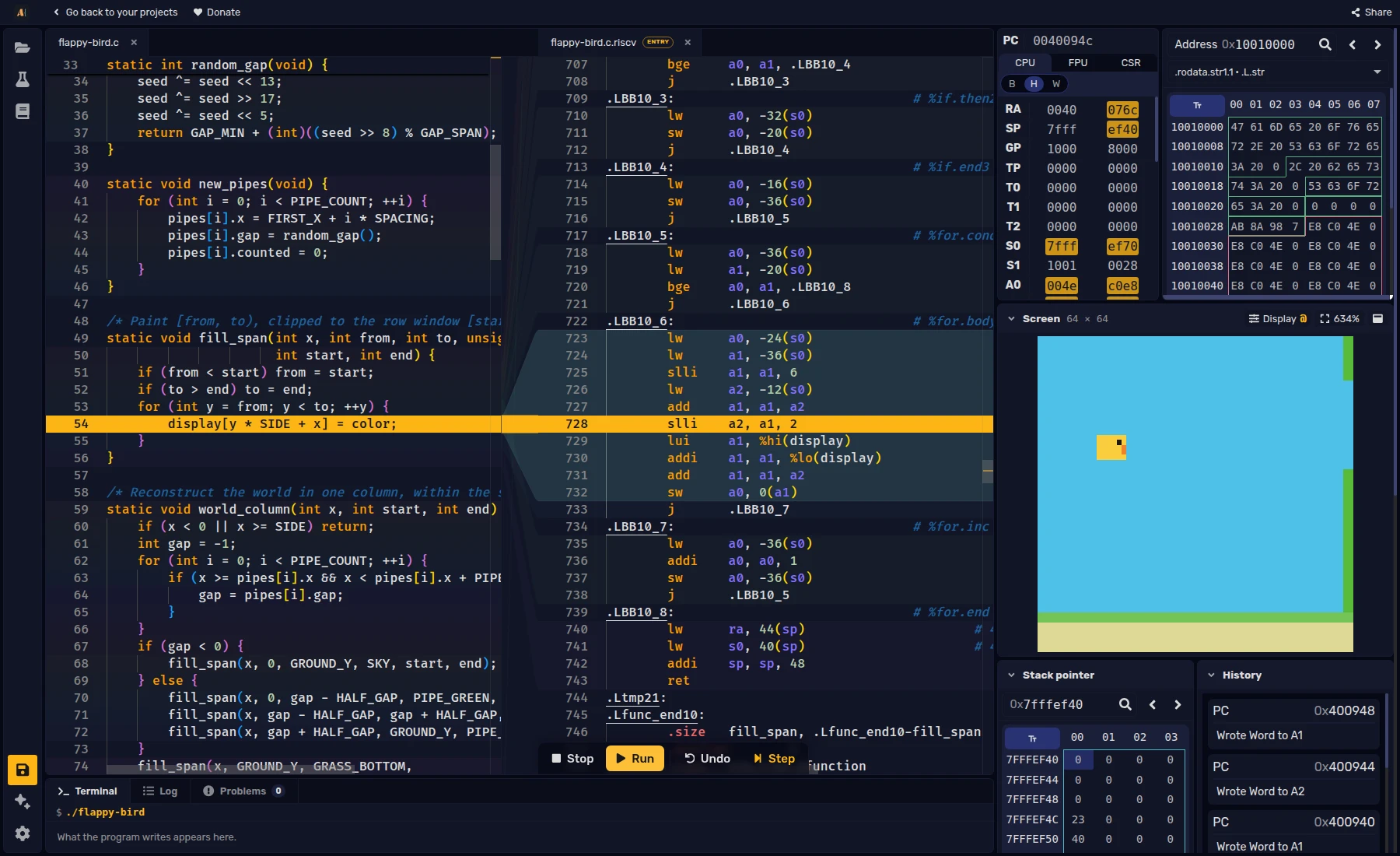
- C/C++ alongside assembly. Compile supported C/C++ programs for RV32 or RV64 and inspect their source and generated instructions side by side. Compilation uses Compiler Explorer and needs an internet connection.
After compilation, the workspace connects C source lines to their generated instructions, as shown in the opening screenshot. You can debug the resulting program with the same register, memory, and execution controls used for assembly projects.
Try ASM Editor
The RV32 example below reads a number and prints twice its value. Press Build to assemble the code, then Run, enter 21 in the terminal, and press Enter. The program will finish executing and print Twice that is 42.
Choose Open in editor to explore the debugger, run the included testcase with Test, or share your own version. The getting-started guide introduces the workspace controls.
.data
prompt: .asciz "Give me a number: "
answer: .asciz "\nTwice that is "
.text
.globl main
main:
li a7, 4
la a0, prompt
ecall
li a7, 5
ecall
mv t0, a0
add t1, t0, t0
li a7, 4
la a0, answer
ecall
li a7, 1
mv a0, t1
ecall
li a7, 10
ecall